Like Zoolander who can't turn right, I thought View Transitions couldn't swoop.
I had been under the impression that they couldn't curve towards the destination, and it was one of those things that you like can't unsee. All view transitions going in straight lines…
All my prior attempts had failed, til now.
The way of the swoop #
When you give something a view-transition-name like:
#ball1 {
  view-transition-name: view-transition-ball;
}
The browser creates keyframes with a predictable naming pattern:
@keyframes -ua-view-transition-group-anim-view-transition-ball {
  …
}
If you pause a view transition, you can see the keyframes and the keyframe name applied to the pseudo elements:
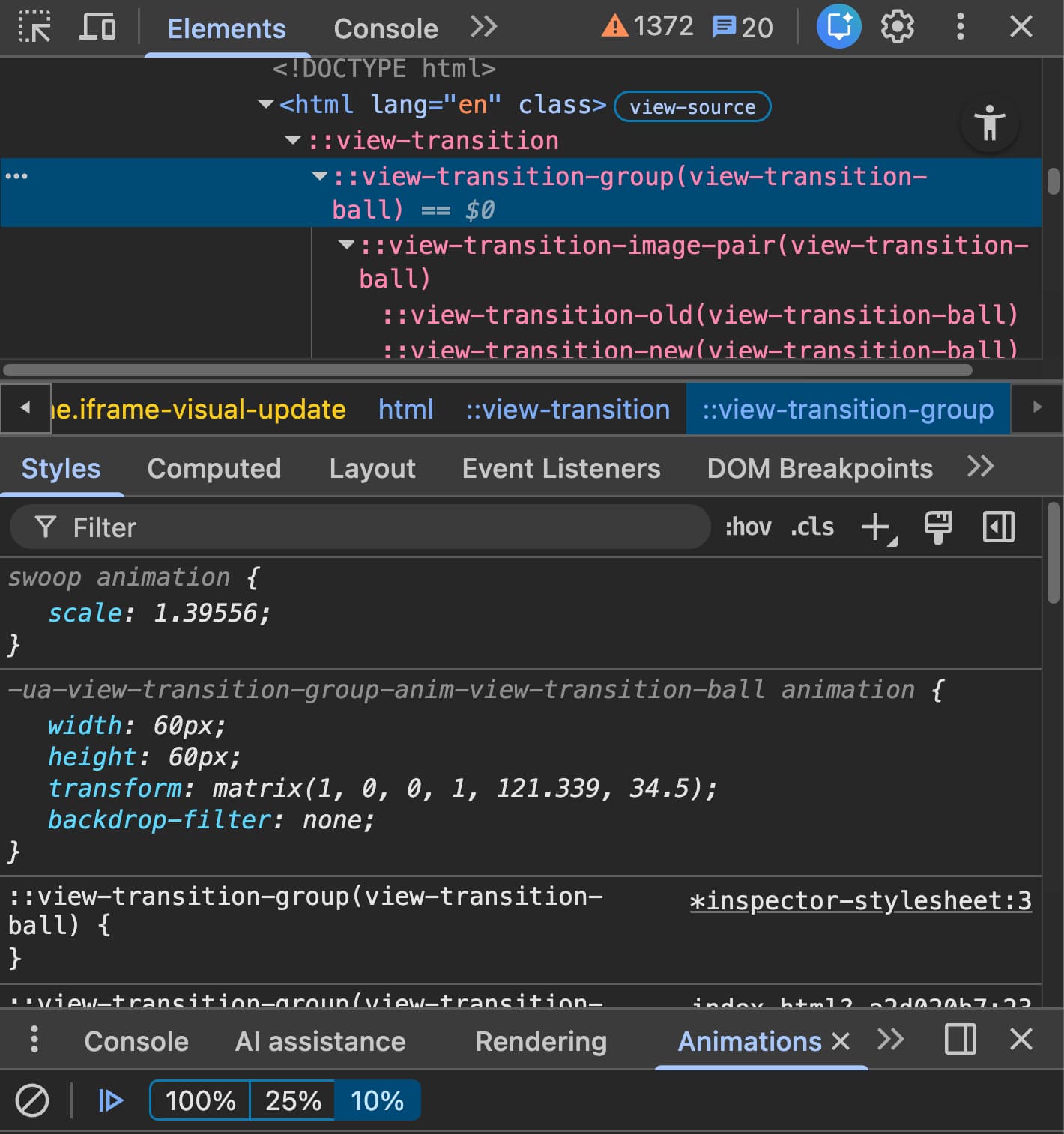
Anticipating that naming consistency, add a comma to the ::view-transition-group() element and include some keyframes of our own:
::view-transition-group(view-transition-ball) {
  animation:
    -ua-view-transition-group-anim-view-transition-ball 2s ease-in-out,
/* 👉*/ swoop 2s ease-in-out;
}
The special sauce, the THING THAT TOOK FOREVER TO FIND, is that you can only use individual transforms, NO transform shorthand:
@keyframes swoop {
  50% {
/* ❌ */ transform: translateY(50px);
/* ✅ */ translate: 0 50px;
  }
}
If you try to change the transform, things fail. And if you try to add animation-composition, things fail harder (don't know why).
BUT, using individual transforms, and just like that, you can blend a scale, translate, or whatever in combination with the browser native transition.
The trick also shows you how you can add a blur to a view transition.
The key to the unlock was individual transforms.
Below is a demo you can try that makes a simple wiggling view transition.
The green ball uses custom keyframes and animation composition, and the pink ball uses view transitions. They dont perfectly match either, which is interesting (exaggerated with a scale added). There's a perspective difference at play I don't fully understand.
You can stop reading here if you want, but I'm about to rant about how this was lame as crap to discover.
The limits #
While I'm glad there's a little bit of a way for it to work, there's plenty to still want.
- No access to the dynamic values that the browser calculates for view transitions
- The solution is clunky and requires static
view-transition-names(nomatch-elementsupport), it breaks if the browsers name their keyframes something else or if I'm assigning names with JS - No support for
animation-composition: add - No way to control the easing of the x vs the y axis separately, or separate durations
I really just wanted to change the X easing to be ease-out and the Y easing to be ease-in. That would give a nice swoop. Or even add a slight delay the X and not the Y, another way to create a swoop.

None of these more normal and better ergonomic ways are available. Just this narrow case with individual transforms and trying to piggy back on a browser keyframe naming convention.
But hey, now we can add swoops to a native view transition and we learned a trick that can make motion blur view transitions. That's coo.